Client-Branded Deal Rooms & Reports
Prepare client sales reports in a breeze, in any way you need.
Creating Client-Branded Reports with CenterCheck Deal Rooms
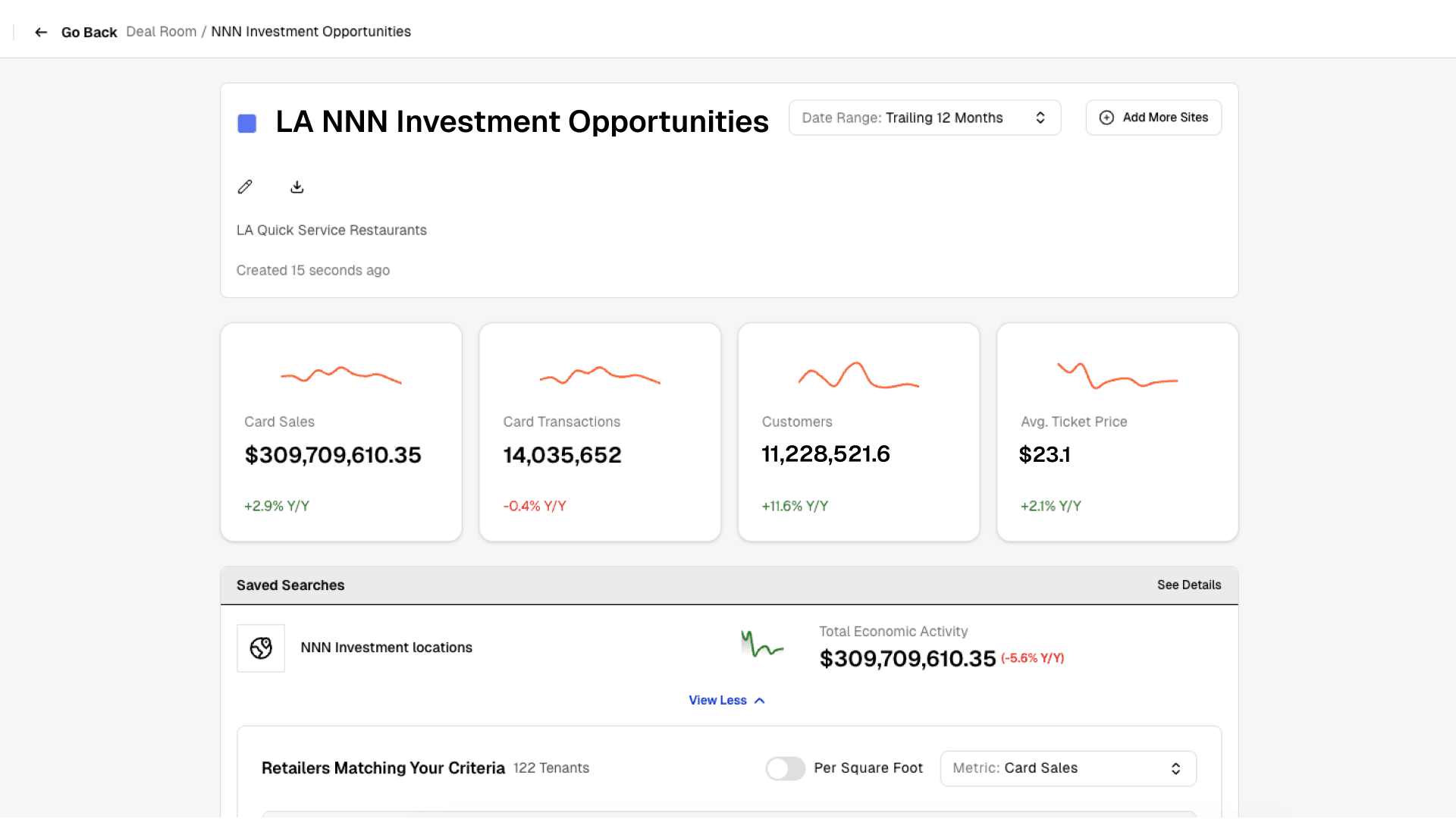
CenterCheck’s new Deal Rooms make it easy to package insights, brand reports, and share opportunities with clients—directly from the platform, in real time.
Defining the Investment Thesis
Deal Rooms are built for real-world use cases. For example, a broker representing a triple-net investor may be searching for underperforming fast food or quick-service restaurants that can be acquired at a discount, re-tenanted, and repositioned.
The process begins by defining the target geography. Users can quickly draw a custom polygon—such as Simi Valley and Ventura in Northern Los Angeles—to establish the market of interest.
Filtering for Underperforming Locations
Once the geography is set, CenterCheck’s filters narrow the universe to stores that fit the client’s criteria. In this case:
- Fast food, quick-service, and casual dining restaurants
- Locations in the lower half of sales performance
- Stores with declining sales and transaction trends
Results update instantly, returning only locations that meet the specified investment thesis.
Reviewing the Trade Area
Before sharing with a client, users can open the Trade Area view, which aggregates the filtered results into a single, clean summary. This view allows users to:
- Sort and search retailers by metrics such as sales per square foot
- Compare performance across locations
- Identify stores that may be underperforming overall but still efficient on a per-square-foot basis
This step helps frame the opportunity before packaging it for review.
Saving to a Deal Room
With one click, the selected trade area—or any individual asset—can be saved to a Deal Room. Each Deal Room acts as a centralized workspace that can contain:
- Single-tenant locations
- Multi-tenant centers
- Trade areas
- Any site or analysis within CenterCheck
Deal Rooms can be renamed, updated, and expanded over time as the opportunity evolves.
Customizing and Branding the Report
Before sharing, users can add a custom description tailored to the client. This messaging appears directly in the report, allowing brokers to contextualize the data, reference the client relationship, and present the opportunity professionally.
Downloading and Sharing
Once finalized, the Deal Room can be downloaded instantly as a client-ready, branded report. The report includes all relevant maps, metrics, and summaries—exactly as seen in the platform—making it easy to print, email, or review live with a client.
Deal Rooms turn CenterCheck from an analysis tool into a presentation and deal-execution platform, allowing users to move seamlessly from discovery to delivery.

Follow Us
A&E’s $600M Loan Default Highlights Rent-Regulated CMBS Struggles

Spirit Halloween Is Acquiring Hot Topic. Here’s What Retail Owners Should Watch For

How Comic-Con 2026 Impacted Retail Sales in San Diego: 10 Findings for Retail Real Estate

What Makes a Good Retail Center? How Midtown Crossing’s Co-Tenants Create Connected Shopping Trips
Recent Blog Posts
Read the BlogA&E’s $600M Loan Default Highlights Rent-Regulated CMBS Struggles
10 min read
Spirit Halloween Is Acquiring Hot Topic. Here’s What Retail Owners Should Watch For
10 min read
How Comic-Con 2026 Impacted Retail Sales in San Diego: 10 Findings for Retail Real Estate
10 min read
What Makes a Good Retail Center? How Midtown Crossing’s Co-Tenants Create Connected Shopping Trips
10 min read